
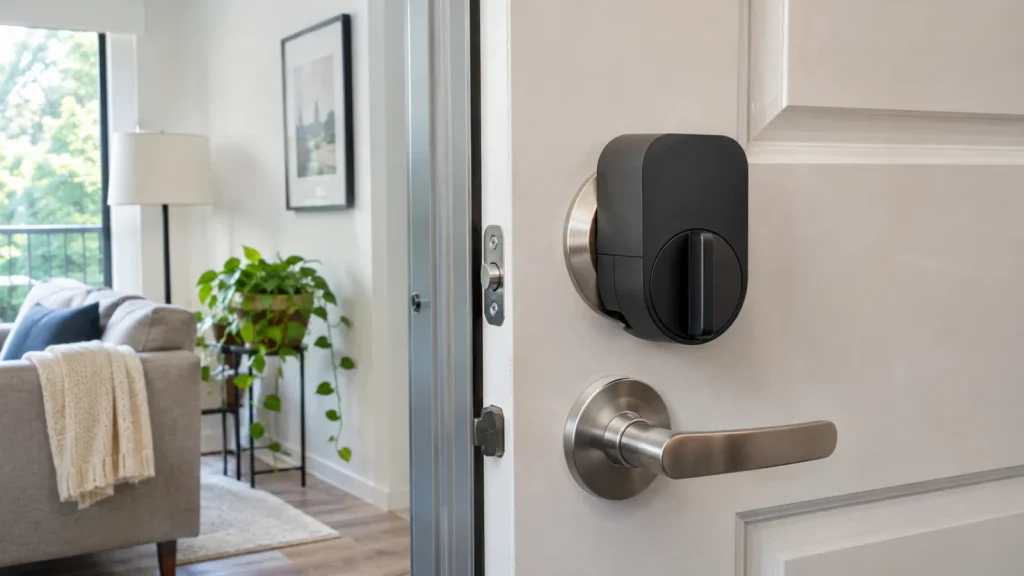
If you rent and want a smart lock, the one I’d recommend first is the August Wi-Fi Smart Lock. It fits over the inside of your existing deadbolt, leaves the outside of the door and every key unchanged, and comes off cleanly when you move out. If you want to leave the landlord’s hardware completely untouched, I’d go for the SwitchBot Lock Pro, which clamps over the thumb-turn without removing a single screw. If price matters most, I’d pick the Wyze Lock, which delivers the same retrofit idea, with remote access included, for noticeably less.
All three are retrofit locks, and that is the type I tell every renter to look for. A retrofit lock motorizes the thumb-turn on the inside of the door. It does not replace the cylinder on the outside, so the lock your landlord holds keys to keeps working exactly as before. That single fact solves most of the problems renters worry about: the landlord keeps access for emergencies and inspections, you keep your physical key as a backup, and the door goes back to its original state when you leave. Many products marketed as “renter friendly” are actually full deadbolt replacements, which means removing the landlord’s lock entirely. In this guide I stick strictly to true retrofits.
Below I give you a deep look at each lock, a clear explanation of what each one needs to work remotely, the conversation to have with your landlord, a step-by-step installation and removal walkthrough, and answers to the questions renters ask most. By the end you should know which lock fits your door, your budget and your lease.
Affiliate disclosure: As an Amazon Associate I earn from qualifying purchases. I may earn a commission when you buy through my links, at no extra cost to you.
Quick picks
- Best overall: August Wi-Fi Smart Lock. Built-in Wi-Fi, a door-position sensor, auto-lock and the widest smart home support of any retrofit.
- Best with no tools: SwitchBot Lock Pro. Mounts over the existing thumb-turn without removing any hardware, with long battery life.
- Best on a budget: Wyze Lock. The lowest-cost retrofit from a familiar brand, with a Wi-Fi gateway in the box.
Please get your landlord’s permission before fitting any of them; I explain why, and how to ask, below.
Compare the three locks
| Lock | How it mounts | Remote access | Keypad | Door sensor | Main compromise | Price |
|---|---|---|---|---|---|---|
| August Wi-Fi Smart Lock | Replaces the inside thumb-turn plate using the existing screws | Built-in Wi-Fi | Sold separately | Included | Highest price; Wi-Fi drains batteries faster | $127.98(as of Nov 29, 2026 6:58 PM UTC+5 – Details)View on Amazon |
| SwitchBot Lock Pro | Fits over the existing thumb-turn with adhesive | Needs a SwitchBot hub | Sold separately | Built in | Larger unit; extras add to the cost | View on Amazon |
| Wyze Lock | Replaces the inside thumb-turn plate using the existing screws | Through the included Wi-Fi gateway | Sold separately | Built in | Fewer smart home integrations | View on Amazon |
Why retrofit locks are the right choice for renters
A standard deadbolt has two halves. On the outside is the keyed cylinder. On the inside is a thumb-turn you twist to throw the bolt. Full smart deadbolts replace both halves, plus the bolt itself. Retrofit smart locks replace, or sit over, only the inside thumb-turn. A small motor turns the bolt for you, controlled by your phone, a keypad, a voice assistant or automation.
For a renter, I see four big advantages in that design. The landlord’s key still works, so property managers can still get in for repairs or emergencies. Nothing visible changes from the hallway, which matters in apartment buildings with rules about door appearance. Installation is reversible, usually in under fifteen minutes. And the lock moves with you to your next home, as long as that door has a compatible deadbolt. A full replacement deadbolt offers none of those benefits and almost always needs explicit approval and a key handover to the landlord.
1. August Wi-Fi Smart Lock: best overall for renters
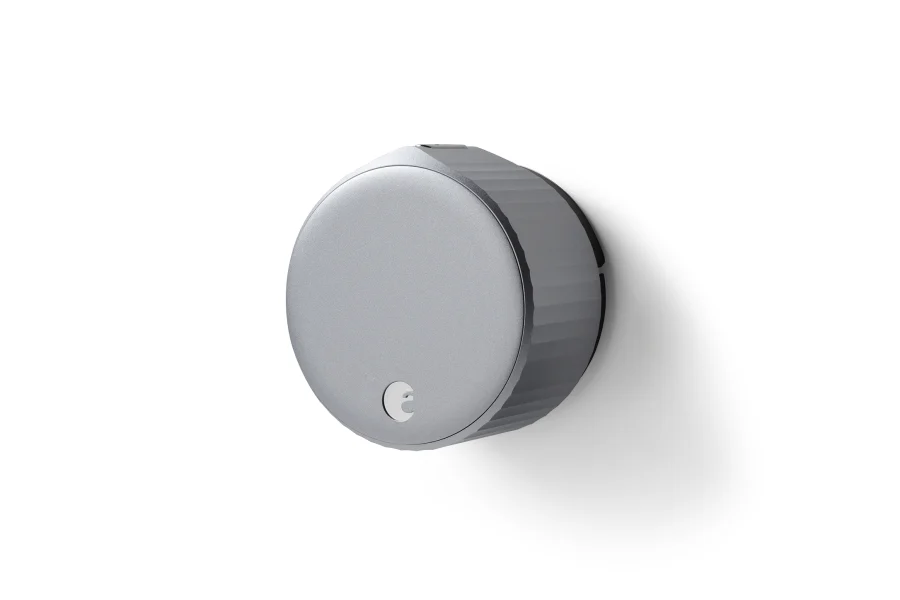
I consider its Wi-Fi model the most complete retrofit lock you can buy. It attaches to the inside of the door in place of the thumb-turn, using the deadbolt’s existing mounting screws and an adapter plate chosen for your lock brand. From the hallway, nothing looks different and the original key still works.
What it does well
Wi-Fi is built into the lock itself, so remote locking and unlocking, guest access and alerts work without a separate bridge plugged in near the door. I like that this keeps the setup tidy and means one fewer device to explain to your landlord. The included DoorSense sensor tells the app whether the door is actually closed, not just whether the bolt is extended, which is the information you really want when you are wondering if you shut the door properly on the way to work.
Auto-Unlock uses your phone’s location to unlock the door as you arrive home, and Auto-Lock locks it a set time after the door closes. Guest access lets you send a dog walker, cleaner or friend a digital key that works only at certain times, then revoke it with a tap. The activity log shows who came and went. August works with Amazon Alexa, Google Assistant and Apple Home, giving it the broadest smart home support of the three, and its app is mature and polished.
Where it falls short
It costs the most of the three. Built-in Wi-Fi uses batteries faster than Bluetooth-only locks, so I’d expect to change them more often than with the SwitchBot. If you want people to enter with a code rather than a phone, the August Smart Keypad is an extra purchase that mounts outside the door; check whether your building allows that. Auto-Unlock depends on phone location services and can occasionally be slow or overly eager, so many owners leave it off until they trust it.
Who should buy it
I’d choose the August if you want the most polished experience, need to give access to visitors regularly, or live in a mixed household of iPhone and Android users. I’d skip it if budget is tight; the Wyze Lock covers the basics for less.
Buying caution: August sells several generations and a Pro model with similar names. Check the listing for built-in Wi-Fi if you do not want a separate bridge, and run August’s online compatibility checker with a photo of your deadbolt before ordering.
2. SwitchBot Lock Pro: best with no tools
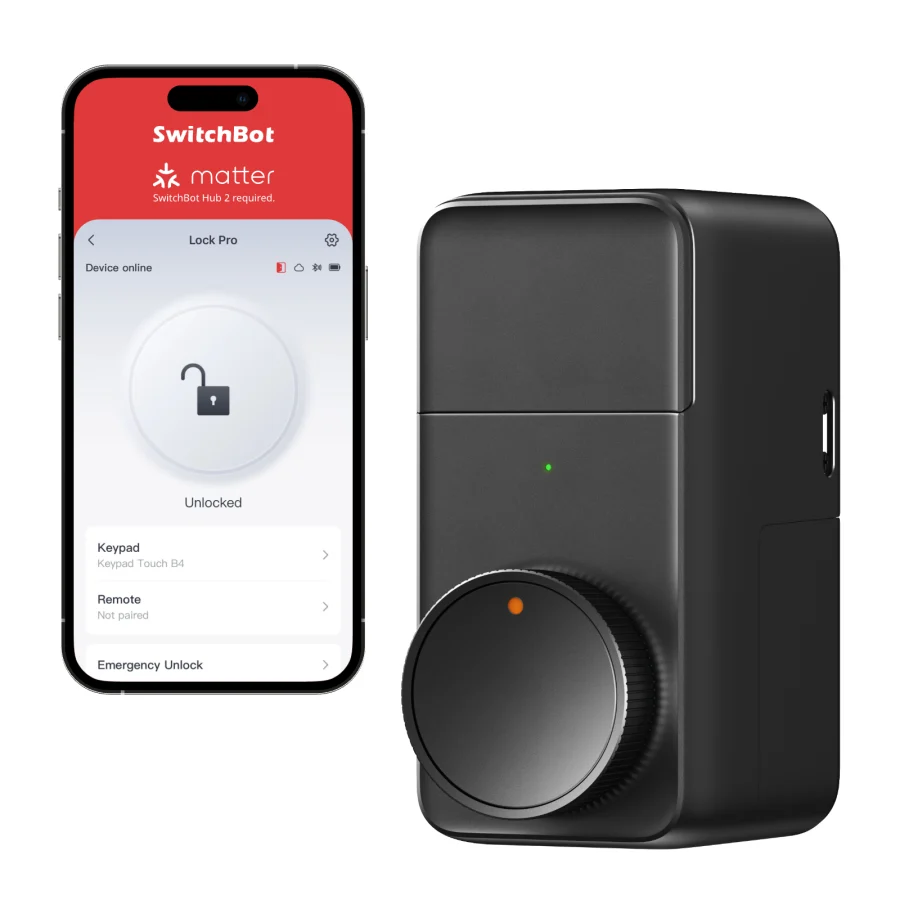
The Lock Pro goes a step further than August and Wyze: it mounts over the existing thumb-turn and grips it, so you do not remove any part of the landlord’s lock. It sticks to the door with strong adhesive pads and adjusts to fit a wide range of thumb-turn shapes. That makes it, in my view, the least invasive option of all and the quickest to take off when you leave.
What it does well
What I like most is that nothing on the door is dismantled, which removes the main thing some landlords object to. You can still turn the thumb-turn by hand from inside through the lock’s own knob. It runs on standard batteries with long claimed battery life, and SwitchBot offers an optional rechargeable pack. A door sensor is built in, auto-lock is supported, and the optional SwitchBot Keypad Touch or Keypad Vision adds codes and fingerprint entry outside the door, often without drilling thanks to adhesive mounting.
Once paired with a SwitchBot hub, the Lock Pro can be exposed to Matter, which lets it work with Apple Home, Google Home, Amazon Alexa and other Matter platforms. If you already own SwitchBot curtain motors, buttons or sensors, it slots into the same app and automations.
Where it falls short
Out of the box it works over Bluetooth only when you are nearby. Remote access and voice assistants need a SwitchBot hub, so I’d compare bundle prices before deciding it is the cheaper option. The unit is larger than the August or Wyze, which some people find bulky on a slim door. The adhesive is strong by design; check that it suits your door surface and read SwitchBot’s guidance on removing it cleanly so you do not damage paint when you move out.
Who should buy it
I’d choose it if your landlord is strict about hardware changes, if you are uncomfortable with a screwdriver, or if you already use SwitchBot devices. I’d skip it if you want remote access without buying a hub.
3. Wyze Lock: best on a budget
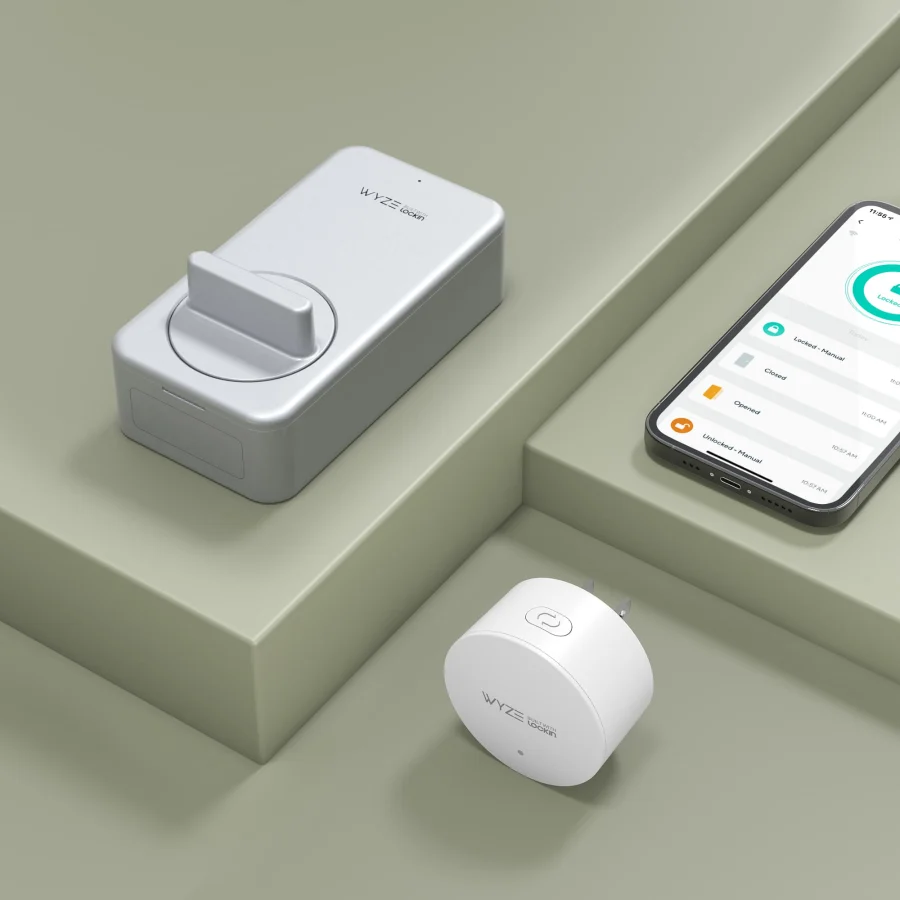
The Wyze Lock follows the same idea as August at a lower price. It replaces the inside thumb-turn using the deadbolt’s existing screws, keeps your key working, and connects to the internet through a small plug-in Wi-Fi gateway that is included in the box.
What it does well
Remote access is included at the base price, which I think is unusual for a budget lock. The app shows lock history, supports auto-lock, and a built-in door sensor reports whether the door is open or closed. It works with Alexa and Google Assistant, and you can share access with other Wyze account holders. If you already use Wyze cameras, everything lives in one app, so you can check the door camera and lock the door from the same screen.
Where it falls short
It has fewer integrations than August, with no Apple Home support. The gateway needs an outlet reasonably close to the door, which can be awkward in a hallway without sockets. Keypad entry is an extra purchase. Wyze’s app is functional rather than polished, and some owners report occasional connection hiccups with the gateway that a restart fixes.
Who should buy it
I’d choose it if you want remote locking at the lowest cost, or if you already own Wyze cameras. I’d skip it if you use an iPhone and want everything in Apple Home.
Buying caution: the Wyze Lock Bolt is a different product that replaces the whole deadbolt. If you rent, I’d look for the retrofit Wyze Lock, not the Bolt.
August vs SwitchBot vs Wyze: how they differ day to day
On paper the three locks do the same job. In daily use, I think a few differences decide which one you will be happiest with.
Getting in without your phone in hand
All three support auto-unlock or quick phone unlocking, but the experience varies. August’s Auto-Unlock is the most established and works across iPhone and Android, though it relies on location services and can occasionally lag. SwitchBot and Wyze both offer phone-based unlocking and work best with their optional keypads, which give a reliable code-based entry that does not depend on your phone at all. If you often come home with your hands full, I’d plan to add a keypad, whichever lock you choose.
Remote access and what it costs
August has Wi-Fi inside the lock: no extra hardware. Wyze includes its gateway in the box: no extra cost, but one more plug near the door. SwitchBot needs a hub bought separately, unless you buy a bundle. When I compare prices, I compare the full remote-access setup, not just the lock, and I’d encourage you to do the same.
Battery life
Locks that talk over Bluetooth and rely on a hub for internet access sip power. Locks with Wi-Fi inside use more. In practice, I’d expect to change batteries in the August more often than in the SwitchBot or Wyze. All three warn you in the app well before the batteries run out, and your physical key always works regardless.
Smart home compatibility
August works with Alexa, Google Assistant and Apple Home directly. SwitchBot reaches all three and more through Matter once paired with a compatible hub. Wyze works with Alexa and Google Assistant but not Apple Home. If you are in the Apple ecosystem, I’d choose the August or SwitchBot. For help choosing a platform, see my comparison of Alexa vs Google Home vs Apple Home.
Looks and size on the door
The August is a compact cylinder that looks neat on most doors. The Wyze is similar in size. The SwitchBot Lock Pro is larger and boxier because it has to fit over the thumb-turn rather than replace it. None is visible from outside the door.
How to ask your landlord
Most leases say you cannot change or add locks without permission. A retrofit lock arguably does neither, because the landlord’s lock stays in place, but I always recommend asking first, because it protects your deposit and avoids awkward conversations later. Landlords tend to say yes far more often when the request is clear and specific. A short message along these lines is what I’d send:
- Name the exact product and include a link to it.
- Explain that it attaches only to the inside of the door and does not change the outside lock or keys.
- Confirm that their existing keys will keep working for maintenance and emergencies.
- Promise to remove it and restore the original thumb-turn when you move out, and to cover any repair if needed.
- Offer to give them a permanent digital key or keypad code if they would like one.
I’d get the answer in writing, even an email or text message. Keep it with your lease. If your landlord says no, an indoor-only option such as a smart door sensor or video doorbell may still be acceptable, and you can revisit the lock later.
Before you buy: five checks
- Get permission in writing. A retrofit keeps the landlord’s key working, which makes approval easier, but most leases still require consent for changes to locks.
- Confirm you have a standard single-cylinder deadbolt. These locks do not fit handle-only locks, mortise locks, double-cylinder deadbolts that need a key on both sides, or many multi-point doors. Use each maker’s compatibility checker with a photo of your lock.
- Test the deadbolt by hand. Close the door and turn the thumb-turn. If you have to push or pull the door to make the bolt slide, a motor will struggle and drain batteries. Ask the landlord to adjust the strike plate first.
- Measure the space around the thumb-turn. A door handle or lever very close to the deadbolt can block a retrofit body. Check the clearance figures in each maker’s specifications.
- Check your Wi-Fi at the door. Stand by the door and confirm your phone has a solid connection. Apartment doors set in thick walls or long corridors can be weak spots.
How to install a retrofit lock, step by step
Installation varies slightly between models, but the process for the August and Wyze is broadly the same, and the SwitchBot is simpler still. I’d set aside thirty minutes the first time, and follow the maker’s in-app guide alongside these general steps.
- Photograph the door first. Take clear photos of the inside and outside of the lock, and of the door around it. These help if you need support, and they document the original condition for your deposit.
- Lock the door and leave it open. Extend the bolt with the door open so you can see it working without locking yourself out.
- Remove the inside thumb-turn (August and Wyze). Unscrew the two screws holding the inside thumb-turn plate. Keep a hand on the outside cylinder so it does not fall out. Put the thumb-turn and screws in a labeled zip bag and store it somewhere safe.
- Fit the mounting plate. Attach the lock’s mounting plate using the original screws, choosing the adapter that matches your lock’s tailpiece.
- Attach the lock body. Clip the lock onto the plate so that it engages the tailpiece, and fit the batteries.
- For the SwitchBot, clean the door around the thumb-turn with the supplied wipe, adjust the lock to fit over your thumb-turn, and press it firmly onto the door. Wait for the adhesive to bond as instructed before use.
- Calibrate in the app. Pair the lock, then follow the calibration steps that teach it the locked and unlocked positions. Fit and calibrate the door sensor.
- Test with the door open, then closed. Lock and unlock several times from the app, by hand and with the key from outside, before you rely on it.
When you move out, reverse the process: remove the lock body and plate, refit the original thumb-turn with its screws, and for adhesive mounts, follow the maker’s removal guidance. Test the original lock with the key before handing it back.
Living with a smart lock: my tips
- Carry a key for the first month. Until you trust the lock and its auto-unlock behaviour, keep a physical key on you.
- Use good batteries. Cheap batteries cause most early problems. Use the type the maker recommends, and replace all of them at once.
- Turn on auto-lock with a sensible delay. Thirty seconds to a few minutes after the door closes is common. Too short, and it may lock while you are still carrying shopping in.
- Give guests scheduled access. Time-limited digital keys or keypad codes are safer than hiding a spare key under the mat.
- Check the activity log occasionally. It is the easiest way to spot a door left unlocked or confirm a delivery person or cleaner came on time.
- Add a keypad if you share the home. Not everyone in a household wants an app; a code works for kids, older relatives and visitors.
Are retrofit smart locks secure?
A retrofit lock does not change the physical strength of your door. The bolt, strike plate and outside cylinder are the same ones you had before, so resistance to kicking or picking is unchanged. What changes is how the bolt can be operated. That adds convenience and also a digital layer to protect. The three brands here encrypt communication between your phone and the lock, and you can reduce risk further by using a strong, unique password for your account, turning on two-step verification, keeping the app and firmware updated, and removing digital keys you no longer need.
In my view, the biggest security improvement for many renters is behavioural: auto-lock means the door is never left unlocked by accident, and the app tells you instantly if it is. That alone closes one of the most common gaps in home security.
Smart lock features explained
Smart lock listings are full of feature names that sound similar. Here is what each one actually does, and how much I think it matters for a renter.
Auto-lock
The lock bolts itself a set time after the door closes, or after it is unlocked if no door sensor is fitted. I consider this the most useful feature on any smart lock, because it removes the “did I lock the door?” worry completely. All three picks support it. Combined with a door sensor, it only locks once the door is actually shut, so the bolt never shoots out into an open door frame.
Auto-unlock
Your phone’s location tells the lock you are arriving home, and the lock unlocks as you reach the door. It feels magical when it works and can be frustrating when it lags. Most apps add safeguards, such as only unlocking after you have been away for a while and only when you are right at the door. I treat it as a convenience you can switch off rather than the main way in.
Door-position sensor
A small magnetic sensor tells the app whether the door is open or closed. Without it, the lock knows only whether the bolt is extended. With it, you get alerts if the door is left ajar and smarter auto-lock behaviour. All three picks include one, either built into the lock or as a separate sensor.
Guest access and digital keys
You can invite other people to unlock the door with their own phone, either permanently or during scheduled hours. This is ideal for roommates, partners, dog walkers and cleaners. Each person’s entries appear in the activity log, and access can be removed instantly, which is far simpler than collecting a physical key back.
Keypads and fingerprint readers
A keypad mounted outside the door lets people enter with a code, with no phone required. Some, like SwitchBot’s Keypad Touch, add a fingerprint reader. Keypads are usually wireless and battery-powered, and many mount with adhesive, but they do sit on the outside of the door or frame, so include them in your conversation with the landlord.
Matter support
Matter is a shared smart home standard that lets one device work with Apple Home, Google Home, Amazon Alexa and others. A Matter-capable lock gives you more freedom to change platforms later, which suits renters who may move between homes and households. SwitchBot’s lock reaches Matter through its hub; check current support for any model before you buy, because brands add Matter through updates.
The true cost of each setup
Retrofit lock prices look similar until you add the accessories most people end up buying. When you compare, I’d price out the setup you actually want, not just the lock.
- Remote access only: August Wi-Fi needs nothing extra. Wyze needs nothing extra because the gateway is included. SwitchBot needs a hub.
- Remote access plus a keypad: all three need a keypad bought separately; SwitchBot also needs its hub. Bundles often save money compared with buying pieces one by one.
- Batteries over time: the August’s Wi-Fi radio uses more power, so budget for more frequent battery changes. SwitchBot’s optional rechargeable pack removes this cost.
For most renters, I see the Wyze Lock as the cheapest route to remote access, the August is the cheapest route to remote access plus Apple Home, and the SwitchBot is worth its extra cost when leaving the landlord’s hardware untouched is the top priority.
If your door is not compatible
Some rental doors simply will not take a retrofit lock: apartments with only a handle lock, buildings with mortise locks, or doors with a lever too close to the deadbolt. I’d still consider these useful options.
- A video doorbell or peephole camera lets you see and talk to visitors from anywhere, which covers much of what people want from a smart lock.
- A contact sensor on the door tells you when it opens and closes, and can trigger lights or alerts.
- A smart key safe or lockbox holds a spare key behind a code, for guests and emergencies, without touching the door lock.
- Ask the landlord about an upgrade. Some landlords will fit a standard deadbolt if you explain why, especially if you offer to pay.
For more renter-friendly ideas across the whole home, see my no-drill smart home guide for renters.
Which lock for which renter?
Renters are not all in the same situation. These are the common scenarios I think about, and how I’d match the three picks to each.
Student or first apartment on a tight budget
The Wyze Lock gives you remote access and auto-lock for the least money, and the gateway is in the box. If your building’s hallway has no outlet near the door, plug the gateway in inside the apartment as close to the door as you can; it does not need to be right next to the lock.
Strict landlord or managed building
The SwitchBot Lock Pro is the easiest to get approved, because nothing on the landlord’s lock is removed or modified. Pair it with SwitchBot’s hub for remote access, and consider skipping the outdoor keypad if the building has rules about the corridor side of the door.
iPhone household that wants everything in Apple Home
The August Wi-Fi Smart Lock works with Apple Home directly, so you can lock the door from Control Center, include it in Home scenes and ask Siri. The SwitchBot can also reach Apple Home through Matter with its hub. The Wyze cannot.
Short-term host or frequent guests
If your lease allows subletting or you regularly host friends, scheduled digital keys and keypad codes are the killer feature. The August has the most mature guest access, and adding its keypad lets guests in without installing an app. Always check your lease and local rules before hosting.
A smart lock can make a shared house or apartment much easier to run, but it works best when everyone agrees on how it is used. Before installing, I’d talk through a few points with your roommates.
- Who owns the lock. If one person buys it, they take it when they leave. Agree on that up front, or split the cost and decide who keeps it.
- Everyone gets their own access. Each roommate should have their own digital key or code, not a shared login, so access can be managed individually.
- Activity logs are visible. The owner of the lock can see who came and went. Be open about that so nobody feels watched.
- Keys still matter. Everyone should keep a physical key for the days when phones die or batteries run low.
Handled this way, a smart lock ends the lost-key and locked-out-roommate problems that make shared living stressful, and it makes adding or removing a housemate far simpler than cutting and collecting keys.
Building entry, intercoms and fobs
A smart lock on your apartment door does not open the building’s front entrance. If your building uses a key fob, a buzzer intercom or a separate street door, guests will still need a way through that first door. Some buildings have smart intercom systems with their own apps; others rely on you buzzing visitors in. Before you promise a dog walker phone-only access, I’d check how they will get through the main entrance. This is also a good question to ask your property manager when you request permission for the lock.
Moving-out checklist
- Remove all guest access and digital keys in the app.
- Take the lock off the door and refit the original thumb-turn with its original screws.
- For adhesive mounts, remove pads carefully following the maker’s guidance, and clean any residue.
- Test the original lock from both sides with the key and the thumb-turn.
- Remove the door sensor and keypad, and fill or touch up any small screw holes if you used them.
- Reset the lock in the app so it is ready to pair at your new home.
A quick checklist before you buy
Before ordering any of the three locks, I’d run through these questions. They take five minutes and cover the problems behind most renter returns.
- Do I have written permission? An email or text from the landlord or property manager is enough, as long as it names the product.
- Is my deadbolt a standard single-cylinder lock with a thumb-turn inside? If not, check each maker’s compatibility tool before buying.
- Does the bolt slide freely with the door closed? If it sticks, ask for the strike plate to be adjusted first.
- Is there space around the thumb-turn? A lever or handle very close to the deadbolt can block the lock body.
- How will I get remote access? Built-in Wi-Fi (August), an included gateway (Wyze) or a separately bought hub (SwitchBot).
- Which assistant do I use? For Apple Home, choose August or SwitchBot with its hub.
- Do I need a keypad? For children, older relatives, guests or roommates without the app, budget for one.
- Where will I store the original thumb-turn and screws? Label a bag now so moving out is easy.
If you can answer yes or give a clear answer to each question, any of the three locks will serve you well for the length of your lease and beyond.
Where to go next
A smart lock is often the first device renters add, and it pairs naturally with a few others. A video doorbell lets you see who is at the door before unlocking it remotely. A door contact sensor confirms the door is closed, and a simple automation can turn on the hallway light when you unlock the door after dark. All of these can be installed without drilling and removed when you move, so your whole setup travels with you from one rental to the next.
Final verdict
Here is my bottom line. Choose the August Wi-Fi Smart Lock for the most complete package, with built-in Wi-Fi and support for every major voice assistant. Choose the SwitchBot Lock Pro if you want to leave the landlord’s hardware completely untouched. Choose the Wyze Lock to spend the least while still getting remote access. For the rest of a rental setup, see my smart home setup guide and my picks for the best video doorbells under $100.
Frequently asked questions
Will my landlord’s key still work?
Yes. A retrofit lock leaves the outside cylinder untouched, so every existing key works as before.
What happens when the batteries die?
You use your key, or turn the lock by hand from inside. The apps warn you well in advance of low batteries, usually for weeks. Carry a key until you trust the lock.
Does the lock work if Wi-Fi is down?
Bluetooth control from your phone at the door, a paired keypad and the physical key all still work. Remote access and alerts wait for the connection to return.
Can I take it with me?
Yes. Refit the original thumb-turn and take the smart lock to your next home, provided that door also has a compatible deadbolt. Reset the lock in the app and re-pair it at the new address.
Will it work on my apartment’s front door?
If the door has a standard single-cylinder deadbolt with a thumb-turn inside, probably yes. Fire doors, mortise locks and doors where the lock and handle are one unit are often not compatible. The makers’ compatibility checkers are the quickest way to be sure.
Can I use a smart lock and a video doorbell together?
Yes, and the combination works well: you see who is at the door, then unlock it remotely for a friend or delivery. Choose products in the same ecosystem, or ones that both work with your voice assistant, so they can share routines.
Do smart locks need a subscription?
No. All three picks offer remote locking, guest access, auto-lock and activity history without a monthly fee. Some brands sell optional plans for extras, but nothing essential to a lock sits behind one.
Can a smart lock be hacked?
Any connected device carries some risk, but reputable smart locks use encrypted communication, and real-world break-ins overwhelmingly involve physical force or unlocked doors rather than digital attacks. Protect your account with a strong password and two-step verification, keep firmware updated, and the bigger risk becomes the same one every door has: someone kicking it.
Will a retrofit lock void my renter’s insurance?
Generally no, because the physical deadbolt is unchanged, but policies vary. If in doubt, a quick email to your insurer gives you a written answer. Some insurers even view auto-locking doors positively.
How long does installation take?
Most people finish in fifteen to thirty minutes, including app setup and calibration. The SwitchBot is usually quickest because no screws are removed.

Abdullah Khan
Smart Home WriterKhan is the smart home writer behind Smart Space Advisor. He is an IT engineer and tech blogger with a knack for making complex technology easy to understand, and he brings hands-on experience solving real-world technical problems to every guide. He covers smart security, video doorbells, smart plugs, lighting and platforms including Matter, Alexa, Google Home and Apple Home, and he labels his recommendations as research-based unless he has used a product himself.
Amazon prices on this page are as of November 29, 2026 6:58 PM UTC+5. Product prices and availability are accurate as of the date/time indicated and are subject to change. Any price and availability information displayed on Amazon at the time of purchase will apply to the purchase of the product.