
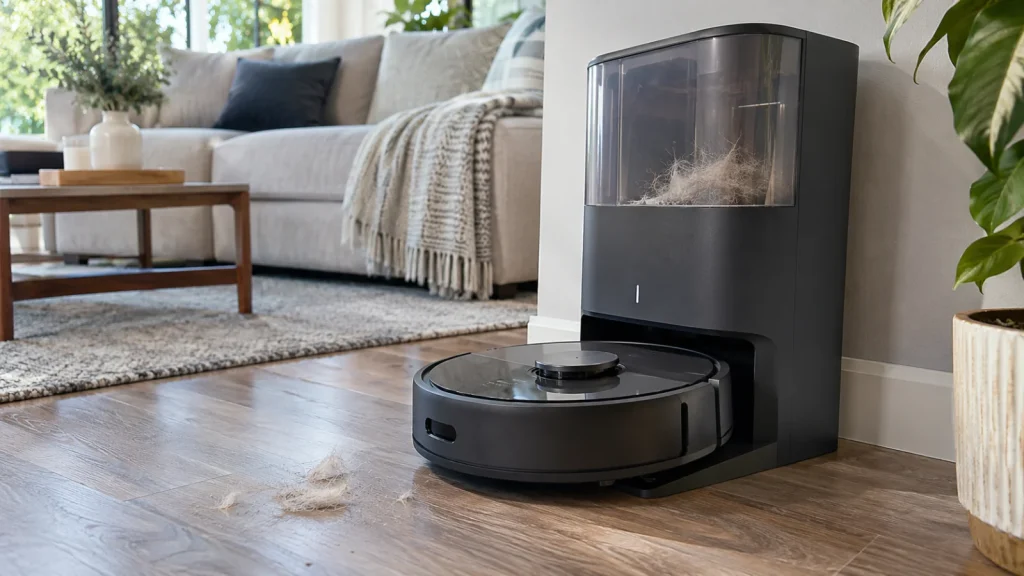
In my view, a self-emptying robot vacuum is worth the extra money if you have pets, allergies, a larger home, or you want the robot to run daily without attention. It is not worth it for a small, mostly hard-floor home where emptying a bin every few days is no trouble. The dock does one job: it moves the chore of emptying from every run to every few weeks.
That sounds minor, but I think the bin is the reason many robot vacuums end up unused. A full bin stops a robot picking up, and a robot that needs attention before each run is no longer automatic. In this guide I weigh what the dock gives you against what it costs.
How a self-emptying dock works
When the robot returns to charge, a second, stronger vacuum inside the dock pulls the debris out of the robot’s small onboard bin and into a much larger container. Most docks use a sealed disposable bag. Some use a bagless canister you tip into the trash.
The difference in capacity is large. A typical robot bin holds a few hundred milliliters. Dock bags are measured in liters, and makers quote weeks of use between changes: iRobot says the dock for its Roomba 105 holds up to 75 days of debris, and eufy quotes about 60 days for the 3-liter bag in its C10 station. I’d expect real intervals to be shorter in homes with pets or heavy foot traffic.
Self-emptying vs standard: what changes
| Factor | Standard robot | Self-emptying robot |
|---|---|---|
| Emptying | Every run or two | Every few weeks to two months |
| Upfront price | Lower | Higher for the same robot |
| Running cost | Filters and brushes | Filters and brushes, plus bags on bagged docks |
| Noise | Robot only | Robot, plus a loud burst of several seconds when the dock empties |
| Floor space | A slim charging dock | A taller, wider station |
| Dust exposure | Each time you empty the bin | Low with a sealed bag |
The real benefits
The robot keeps working when you forget about it
With a scheduled daily clean, a standard robot’s bin fills within days in a busy home. Once full, it pushes debris around. A dock keeps the bin clear so every run starts empty, which is what makes daily scheduling practical.
Less dust in the air
Tipping a small bin into the trash releases a puff of fine dust. A sealed bag closes as you remove it, so you handle the dirt once every few weeks and barely see it. For anyone with dust allergies, I see this as the strongest reason to pay for a dock.
It copes with pet hair
Hair is bulky and fills a small bin fast, sometimes in a single room. Emptying after each run, or mid-run on some models, lets the robot finish the house. If shedding is your main problem, see my best robot vacuums for pet hair.
The costs people overlook
The price gap
The same robot usually costs noticeably more with a dock than without. At the budget end, that difference can be most of the price of the robot itself. I’d ask yourself whether you would get more from the dock or from spending the same money on better navigation.
Bags are an ongoing purchase
Bagged docks need replacement bags a few times a year. Packs are inexpensive, but I’d check that bags for your exact model are easy to find, including lower-cost compatible ones. Bagless docks avoid the expense and bring back some of the dust when you empty the canister.
The emptying noise
The dock is much louder than the robot for the few seconds it runs. That matters if the station sits near a bedroom or the robot cleans while a baby sleeps. Many apps let you limit or schedule emptying, so I’d look for that setting.
Space and clogs
A station is taller and deeper than a basic charger and needs clear floor in front of it. The transfer path can also clog on large debris or damp dirt, which means clearing a tube by hand now and then.
What a dock costs over three years
The upfront price gap is the obvious cost, but I like to think about the whole ownership period. Over three years, a self-emptying robot typically adds three costs compared with the same robot on a basic charger.
- The dock premium: paid once, and often the largest single cost. It is smallest during major sales, when docked bundles are discounted heavily.
- Bags: if a bag lasts one to two months, you will use somewhere around twenty to thirty-five bags over three years. Multi-packs, including compatible third-party bags, keep the cost per bag low.
- Electricity: the emptying motor runs for only seconds each day, so its energy cost is tiny.
Weigh that against what you get back: roughly a few minutes saved every time the bin would otherwise need emptying, a robot that actually runs on schedule, and less dust in the air. For a pet owner with a daily schedule, I think that trade is usually worthwhile. For someone who runs the robot twice a week in a small flat, I rarely think it is.
Bagged vs bagless docks in more detail
Bagged docks draw debris into a disposable bag that seals as you lift it out. They are the cleaner option, they trap fine dust and allergens well, and they need little maintenance beyond swapping the bag. Their drawbacks are the running cost of bags and the small amount of waste they create.
Bagless docks collect debris in a clear canister that you empty into the trash, much like a bagless upright vacuum. There are no bags to buy, and you can see when the canister is full. The trade-off is that emptying it releases some dust, and the dock’s filter needs regular cleaning or replacement to keep suction strong. I’d recommend bagless docks to people without allergies who want to avoid ongoing purchases.
What to look for in a self-emptying robot
- Mapped navigation first. To me, a dock is a convenience; mapping is what makes the robot clean well. I’d prioritize LiDAR or reliable camera-based mapping.
- Bag capacity and availability. Larger bags mean fewer changes. Check that bags for the exact dock model are widely sold.
- Emptying controls. Look for apps that let you schedule emptying, skip it at night or empty only after certain runs.
- A tangle-resistant brush. Hair wrapped around the brush stops debris reaching the bin, and the dock cannot fix that.
- Dock footprint. Measure the spot where it will go, including clearance in front for the robot to dock.
- Bundle clarity. Confirm the listing includes the dock; robot-only and docked bundles often share a name.
Placing and maintaining the dock
I’d put the station on a hard, level floor against a wall, with clear space on each side and in front so the robot can line up. Avoid placing it near stairs, in tight corners or in a bedroom if the emptying noise would disturb anyone. Every few weeks, check the evacuation port where the robot connects to the dock and clear any lint or hair. When the app reports a full bag, replace it promptly; a full bag reduces emptying power and can leave debris in the robot. If emptying suddenly fails, look for a clog in the tube between the port and the bag, which usually clears with gentle prodding.
Three typical homes and how I’d decide
A family with a shedding dog in a three-bedroom house. Without a dock, the robot’s bin fills partway through each daily run, so it stops picking up hair before it finishes the house. Someone has to empty it every day, and often mid-run. With a dock, the robot empties after each run, and the bag needs changing roughly monthly. To me, this is the clearest case for paying extra.
A couple in a one-bedroom apartment with hard floors. The robot runs three times a week and the bin is barely half full after each run. Emptying it takes ten seconds. A dock would add cost, noise and a bulky station to a small space for very little benefit. I’d put the money toward better navigation instead.
An older homeowner with dust allergies. Bending to remove the bin is uncomfortable, and tipping it out stirs up dust that triggers symptoms. A dock with sealed bags reduces both problems to an occasional bag change. Even in a small home, I think the health and comfort benefits can justify the dock.
The pattern I see is consistent: the more often the bin would need emptying, and the harder or less pleasant that job is for you, the more the dock is worth.
What a dock does not do
A self-emptying dock does not make a robot maintenance-free. You still need to remove hair from the brushes, wipe the sensors and replace filters, and the robot still needs a tidy floor to work on. My robot vacuum cleaning guide covers that routine.
It also does not improve cleaning. A robot that navigates poorly will navigate poorly with a dock. If your budget forces a choice, I’d pick mapped navigation, because it usually improves results more than self-emptying does. My navigation explainer shows why.
Who should buy one, and who can skip it
Worth it if
- You have one or more shedding pets.
- Someone in the home is sensitive to dust.
- You want the robot to run every day on a schedule.
- Your home is large or carpeted, so the bin fills quickly.
- Bending to remove and empty a small bin is difficult for you.
Skip it if
- You live in a small apartment with hard floors and no pets.
- You run the robot a couple of times a week and do not mind emptying it.
- You have no floor space for a larger station.
- Your budget is tight and the dock would mean giving up mapping.
A quick decision checklist
These are the five questions I’d ask. Answer them honestly. If you answer yes to two or more, a self-emptying dock is likely worth it for you.
- Do you have a pet that sheds, or several people with long hair?
- Does anyone in the home have dust allergies or asthma?
- Do you want the robot to run every day without checking on it?
- Is your home larger than a typical apartment, or mostly carpeted?
- Is bending to remove a small bin awkward or uncomfortable for you?
If you answered no to all of them, I’d save the money and choose the best-navigating robot you can afford instead. You can usually find docked bundles at much lower prices during major sale events if you change your mind later.
My verdict
Here is my bottom line. Pay for self-emptying when the bin is what would stop you using the robot: pets, allergies, daily schedules or a large home. Skip it when your home is small and your floors are easy, and put the money toward better navigation. If you are choosing your first robot, my guides to brush roll vs no brush roll and the best robot vacuums without WiFi cover the other decisions that shape the purchase.
Frequently asked questions
How often do you change the bag?
Makers quote 45 to 75 days. I’d expect closer to a month with pets or daily cleaning of a large home. Most apps or docks tell you when the bag is full.
Can I add a self-emptying dock later?
Sometimes. A few robots are sold with and without a compatible dock, and the dock is available separately. Many are not upgradeable, so I’d check before buying the cheaper version with that plan in mind.
Bagged or bagless dock?
I prefer bagged: it is cleaner to handle and better for allergies. Bagless costs nothing to run but exposes you to dust when you empty it and needs its filter cleaned.
Do self-emptying docks work with robot mops?
A dust-emptying dock handles dry debris only. Stations that also wash mop pads and refill water are a separate, more expensive category.
Do self-emptying docks smell?
They can if damp debris or food scraps sit in the bag for weeks. I’d avoid running the robot over wet spills and change the bag when it is full rather than waiting; some bags also include odor-reducing layers. A bagless canister should be emptied and wiped regularly.
Are self-emptying robots good for people with limited mobility?
Often, yes. Bending down to remove and empty a small bin every day is one of the hardest parts of owning a robot vacuum for some people. A dock reduces that to an occasional bag change at a more comfortable height.
Can I use third-party bags?
Many owners do, and compatible bags are widely sold for popular docks. Fit and filtration quality vary, so I’d read reviews and buy from reputable sellers. Using non-official bags generally does not stop the dock working, but check the warranty terms if that matters to you.

Abdullah Khan
Smart Home WriterKhan is the smart home writer behind Smart Space Advisor. He is an IT engineer and tech blogger with a knack for making complex technology easy to understand, and he brings hands-on experience solving real-world technical problems to every guide. He covers smart security, video doorbells, smart plugs, lighting and platforms including Matter, Alexa, Google Home and Apple Home, and he labels his recommendations as research-based unless he has used a product himself.