
Affiliate Disclosure: SmartSpaceAdvisor.com is a participant in the Amazon Services LLC Associates Program. We may earn a commission when you buy through our links at no extra cost to you. Our recommendations are always based on honest research — never paid placements.
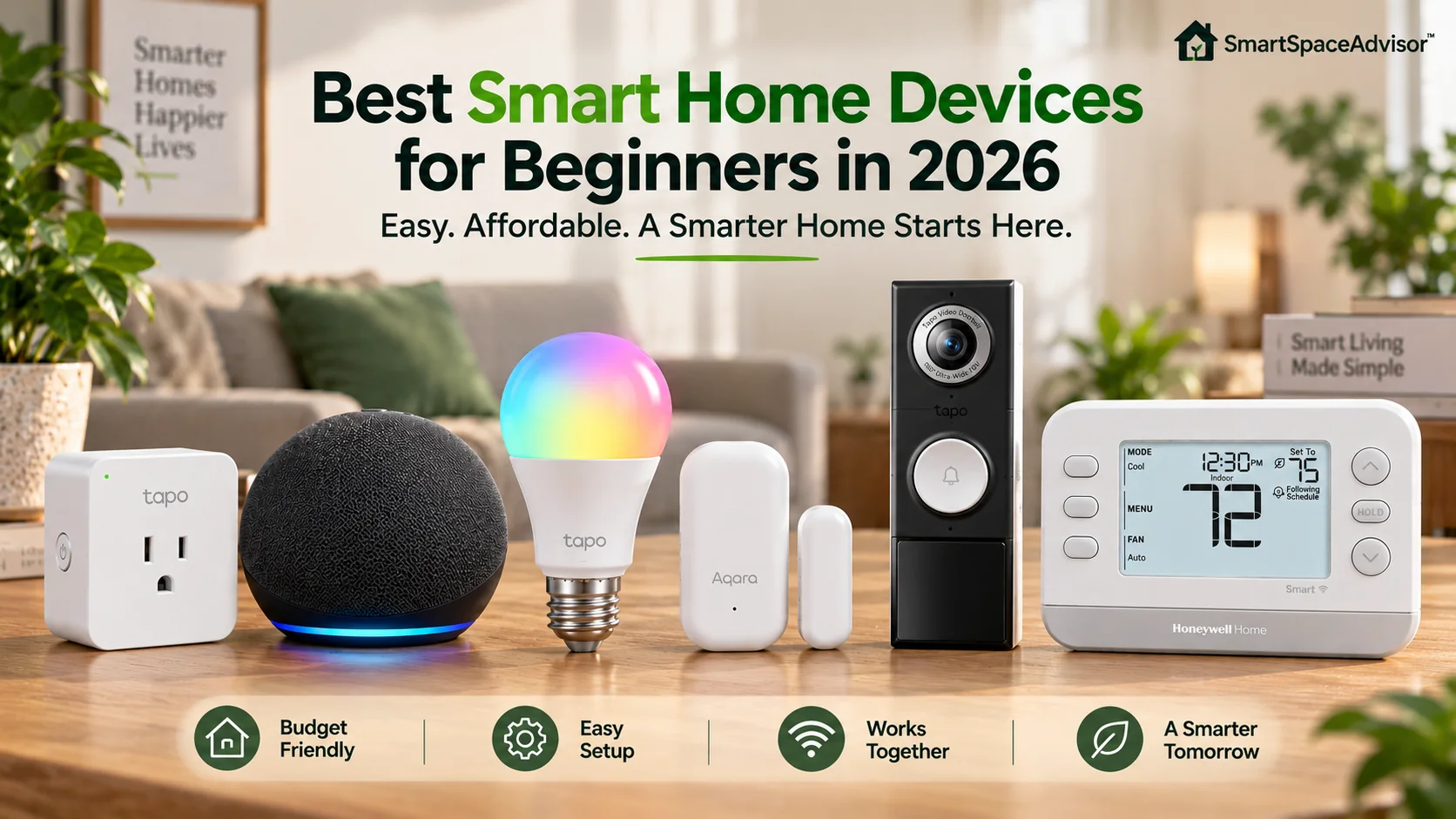
Starting a smart home doesn’t require a dozen devices, a complicated hub or a huge budget.
For most beginners, the best approach is much simpler: start with one device that solves an everyday problem. A smart plug can automate a lamp. A smart bulb can handle your evening lighting. A smart speaker makes voice control convenient. Once those basics are useful, you can expand into sensors, security and climate control.
The important part is choosing devices that are easy to live with and won’t unnecessarily lock you into one ecosystem.
For most people, our favorite first smart-home device is the Tapo P125M smart plug. It’s simple to install, supports Matter and lets you experiment with schedules, remote control and automations without changing your home’s wiring. TP-Link lists compatibility with Apple Home, Alexa, Google Assistant and SmartThings through its Matter support.
But a smart plug isn’t necessarily the right first purchase for everyone. Here’s where we’d start depending on what you actually want your smart home to do.
Best Smart Home Devices for Beginners: Quick Comparison
| Category | Our Pick | Best For | Matter | Extra Hub Required? | Price |
|---|---|---|---|---|---|
| Best first device | Tapo P125M | Simple automation | Yes | No for Tapo app/Wi-Fi use* | View Updated Price |
| Best smart speaker | Amazon Echo Dot Max | Alexa households | Yes | No | View Updated Price |
| Best smart bulb | Tapo L535E | Smart lighting | Yes | No for Tapo app/Wi-Fi use* | View Updated Price |
| Best sensor | Aqara Door and Window Sensor P2 | Automations | Yes | Thread Border Router required | View Updated Price |
| Best video doorbell | Tapo D225 | Front-door security | No | No | View Updated Price |
| Best thermostat | Honeywell Home X2S | Climate control | Yes | Depends on setup/ecosystem | View Updated Price |
*Using a device through a third-party Matter ecosystem can require the appropriate Matter controller for that platform.
Our recommendation in one minute
If you’re completely new to smart-home technology, start with a smart plug or smart bulb.
Choose a smart speaker next if you want voice control. Add sensors once you’re ready to build automations that respond to what’s happening around your home. Video doorbells and thermostats can provide more meaningful upgrades, but they require more thought about installation, compatibility and cost.
You don’t need all six products on this list.
In fact, we’d recommend that you don’t buy them all at once.
Our Top Picks
Here are our top picks:
1. Tapo P125M — Best First Smart Home Device
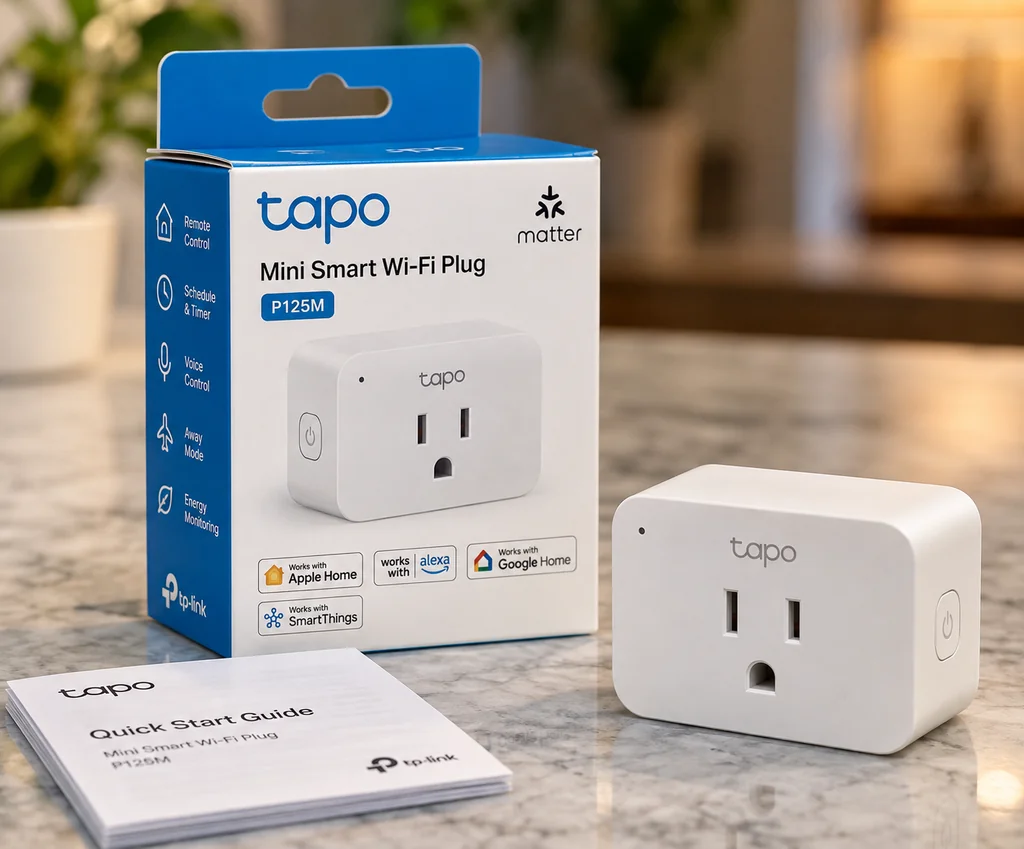
The Tapo P125M is the device we’d recommend to most people who simply want to find out whether smart-home technology is useful to them.
It’s a compact smart plug that sits between a wall outlet and a compatible appliance. Once configured, you can remotely switch the connected device on or off, create schedules, set timers and build automations.
TP-Link lists the P125M as Matter-certified, with support for Apple Home, Amazon Alexa, Google Assistant and Samsung SmartThings. It connects over 2.4GHz Wi-Fi and uses Bluetooth during setup. The U.S. model is rated for up to 15A/1,800W at 120V for general-use/resistive loads.
Why we recommend it for beginners
There is almost no commitment involved.
You don’t have to replace a wall switch, modify wiring or install a permanent fixture. If you decide smart-home automation isn’t for you, unplug it and you’re essentially back where you started.
More importantly, a smart plug introduces you to several core smart-home features at once.
You can have a lamp switch on automatically in the evening, set a compatible fan to turn off after a certain period, control something remotely, or include the plug in a larger bedtime routine.
The P125M’s Matter support is another reason we like it for a first purchase. It gives you more flexibility across major ecosystems instead of forcing you to make every future purchase from TP-Link.
What we don’t like
A smart plug doesn’t magically make every appliance smart.
It works best with appliances that resume operating when power is supplied. Some products with electronic controls require you to press their own power button after power is restored, limiting what a smart plug can automate.
You also need to respect the plug’s electrical rating and the requirements of whatever you connect to it.
Who should buy it?
Buy the P125M if you want an inexpensive, low-risk introduction to smart-home automation.
If you want more options before choosing, see our Best Smart Plugs of 2026.
Bottom line: The Tapo P125M is where we’d start if you have no smart-home equipment and aren’t sure what to buy first.
2. Amazon Echo Dot Max — Best Smart Speaker for Beginners
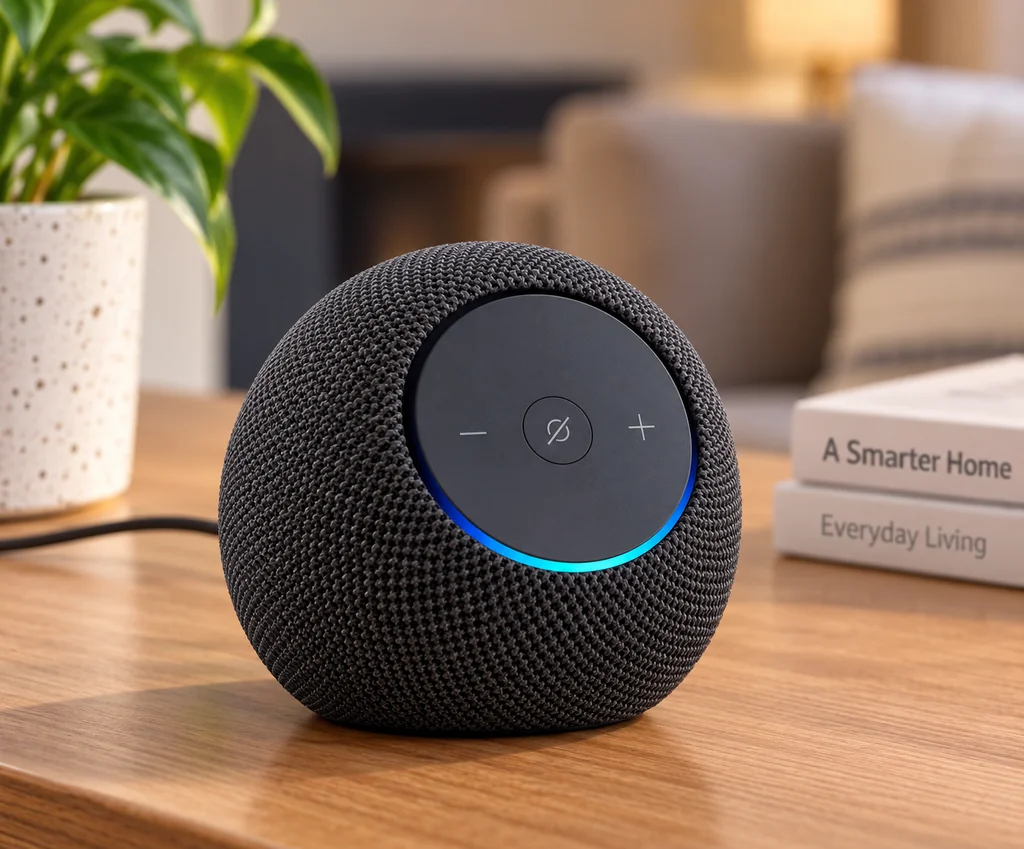
A smart speaker isn’t essential to a smart home, but it can make one considerably easier to use.
Instead of finding your phone and opening an app, you can ask Alexa to turn off a compatible lamp, adjust supported devices, trigger routines or control several devices together.
That’s why an Echo can become more valuable as your smart home grows.
The Echo Dot Max is particularly interesting for an Alexa-centered home because Amazon built more smart-home infrastructure into it than you get from a basic speaker. It supports Matter and can act as part of an Alexa smart-home setup, reducing the need to think about separate controllers for some compatible devices.
Why we recommend it for beginners
The biggest advantage is simplicity.
A smart home shouldn’t require every person in the house to know which manufacturer’s app controls which device.
Once compatible products are connected to Alexa, voice control provides a common interface.
For example:
“Alexa, good night.”
A routine could then control multiple compatible devices rather than requiring you to operate each one individually.
The speaker is useful even before you build a larger smart home, so you’re not buying a device whose only purpose is acting as infrastructure.
What we don’t like
The Echo Dot Max is not the cheapest way to get Alexa.
If you only want basic voice control, a less expensive Echo model may be enough.
More importantly, don’t choose an Echo just because Alexa supports lots of devices. If your household is already heavily invested in Apple Home or Google Home, staying within that ecosystem may give you a simpler experience.
Who should buy it?
The Echo Dot Max makes the most sense for beginners who want Alexa to become one of the main ways they control their home and who expect to add more smart devices later.
See our Echo Dot Max vs Google Home Speaker comparison if you’re deciding between ecosystems, or browse our Best Smart Speakers Under $100 for alternatives.
Bottom line: Choose the Echo Dot Max if you want Alexa at the center of a smart home that you plan to expand.
3. Tapo L535E — Best Smart Bulb for Beginners
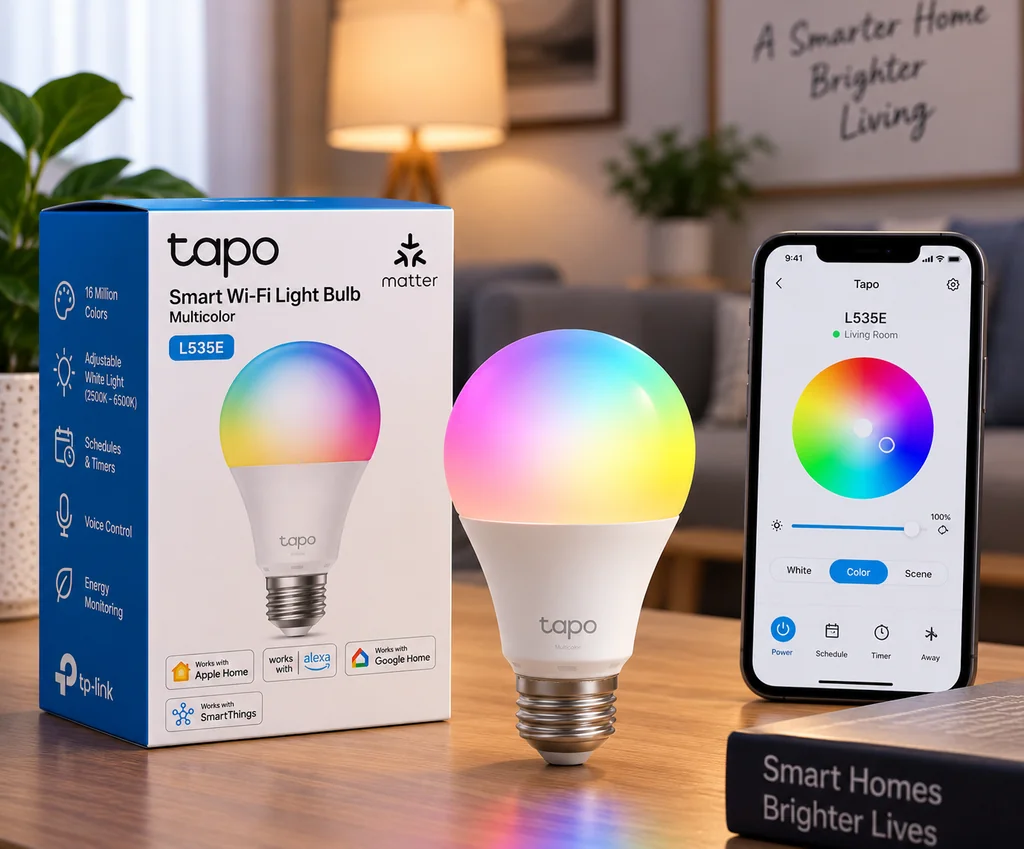
A smart bulb is another excellent first purchase because the benefit is immediately obvious.
The Tapo L535E lets you remotely control your lighting, adjust brightness and color temperature, choose colors, create schedules and build lighting into automations.
The current U.S. model is rated at 1,055 lumens, supports millions of colors and has an adjustable white range of 2,500K to 6,500K. It connects directly to 2.4GHz Wi-Fi and doesn’t require a dedicated Tapo hub for normal Tapo operation. TP-Link also lists Matter support.
Why we recommend it for beginners
Installation is about as straightforward as smart-home upgrades get.
Install the bulb in a compatible fixture, leave the fixture powered and complete the setup process.
Then you can experiment with useful automations without making permanent changes to your home.
For example, you could have your lights come on before sunset, use cooler light while working, shift toward warmer light in the evening and switch everything off as part of a bedtime routine.
The L535E also includes energy monitoring through the Tapo app, which is a useful extra for anyone curious about lighting consumption.
What we don’t like
Smart bulbs work best when the physical wall switch remains on.
If someone turns the switch off, the bulb loses power and cannot respond to an app, schedule or voice command until power is restored.
That’s not unique to Tapo; it’s an important characteristic of smart bulbs generally.
We’ve explained the issue in detail in Do Smart Bulbs Use Electricity When Off?.
Also make sure you’re buying the correct bulb base and voltage for your market.
Who should buy it?
The L535E is a good choice for renters, beginners and anyone who wants to automate a lamp or room without replacing a wall switch.
For cheaper options, see our Best Smart Light Bulbs Under $20.
Bottom line: The Tapo L535E is an easy way to experience lighting automation without changing your home’s wiring.
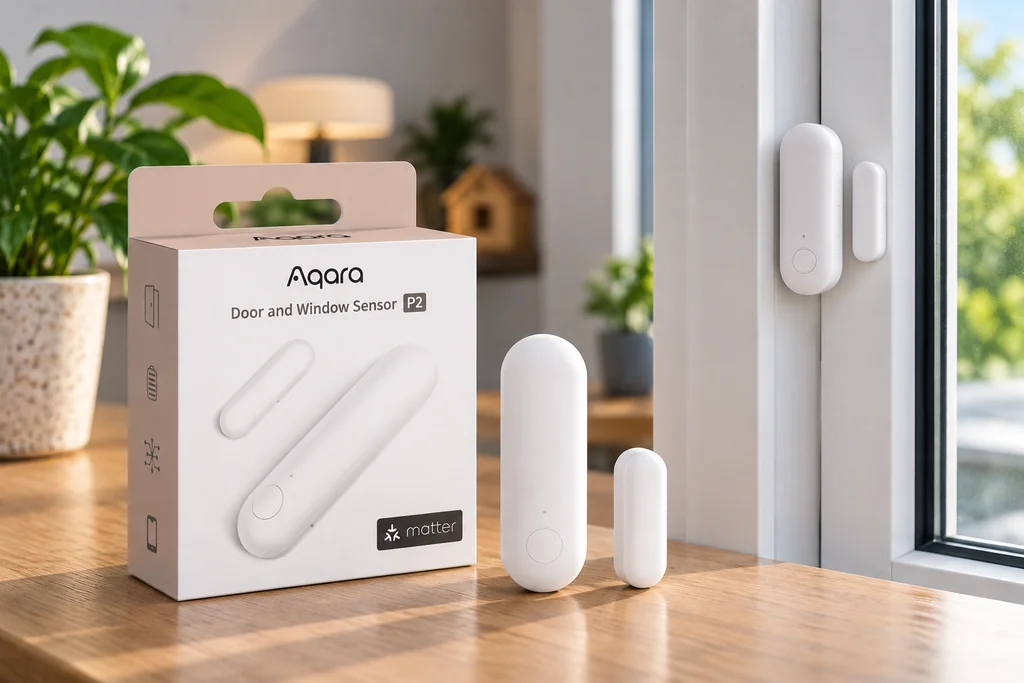
4. Aqara Door and Window Sensor P2 — Best Smart Sensor for Beginners
Smart plugs and bulbs let you control things.
Sensors let your home react to things.
That’s an important step toward useful automation.
The Aqara Door and Window Sensor P2 detects whether a door, window or similar opening is open or closed. That state can then trigger compatible automations.
You could create an automation such as:
Front door opens after sunset → hallway light turns on.
Or
Window opens → send an alert.
The P2 uses Matter over Thread and can connect with ecosystems including Apple Home, Google Home, Amazon Alexa and SmartThings when the required Matter/Thread infrastructure is available.
Why we recommend it
Sensors are where smart homes begin doing useful things without waiting for you to issue a command.
Instead of telling a light to turn on, a sensor can become the trigger.
The P2 is also easy to physically install because Aqara uses adhesive mounting rather than requiring electrical wiring.
The big catch beginners need to understand
Unlike the Tapo plug and bulb above, the Aqara P2 isn’t a standalone Wi-Fi device.
Aqara specifically states that a compatible Matter controller and Thread Border Router are required for use with a Matter ecosystem. Supported examples include devices such as HomePod mini, certain Apple TV 4K models, Echo (4th generation), Nest Hub (2nd generation), Nest Hub Max and Nest Wi-Fi Pro.
This makes the P2 a good second- or third-stage purchase rather than the first device we’d buy.
Who should buy it?
Buy it once you already have compatible Matter/Thread infrastructure and want to move beyond remote control into reactive automations.
Bottom line: A smart sensor is one of the best ways to make a smart home genuinely automatic, but check your Thread infrastructure before buying.
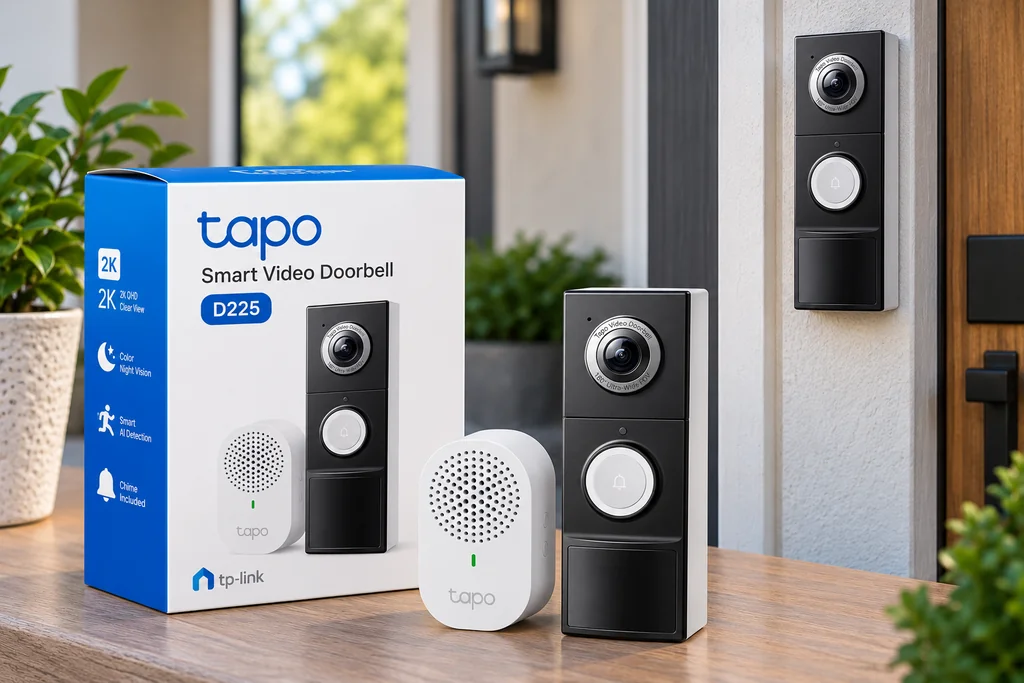
5. Tapo D225 — Best Video Doorbell for Beginners
If your main reason for building a smart home is security rather than convenience, a video doorbell may be a better early purchase than another light or plug.
The Tapo D225 is our beginner-friendly choice because it combines flexible installation with useful local-storage options.
TP-Link lists 2K 4MP QHD video, two-way audio, person detection and a built-in rechargeable 10,000mAh battery. It can operate from its battery or use compatible hardwiring.
Why we recommend it for beginners
The installation flexibility matters.
Renters or people who don’t want to rely on existing doorbell wiring can use the battery, while compatible homes can take advantage of a wired installation.
Storage is another strength.
The D225 supports a microSD card of up to 512GB for local recording, while Tapo Care cloud storage is available separately as a subscription service.
That gives you a choice rather than making cloud storage your only recording option.
What we don’t like
A doorbell is more complicated than a smart plug or bulb.
Before buying, check:
- Wi-Fi strength at your front door
- your preferred installation method
- where recordings will be stored
- notification settings
- existing doorbell wiring if you plan to hardwire it
The D225 uses 2.4GHz Wi-Fi, so network conditions at the installation location matter.
Who should buy it?
The D225 makes sense for beginners who care most about visitors, deliveries and front-door monitoring.
For more choices, see our Best Smart Video Doorbells Under $100.
Bottom line: The Tapo D225 is a flexible entry into smart-home security, particularly if you value the option of local storage.
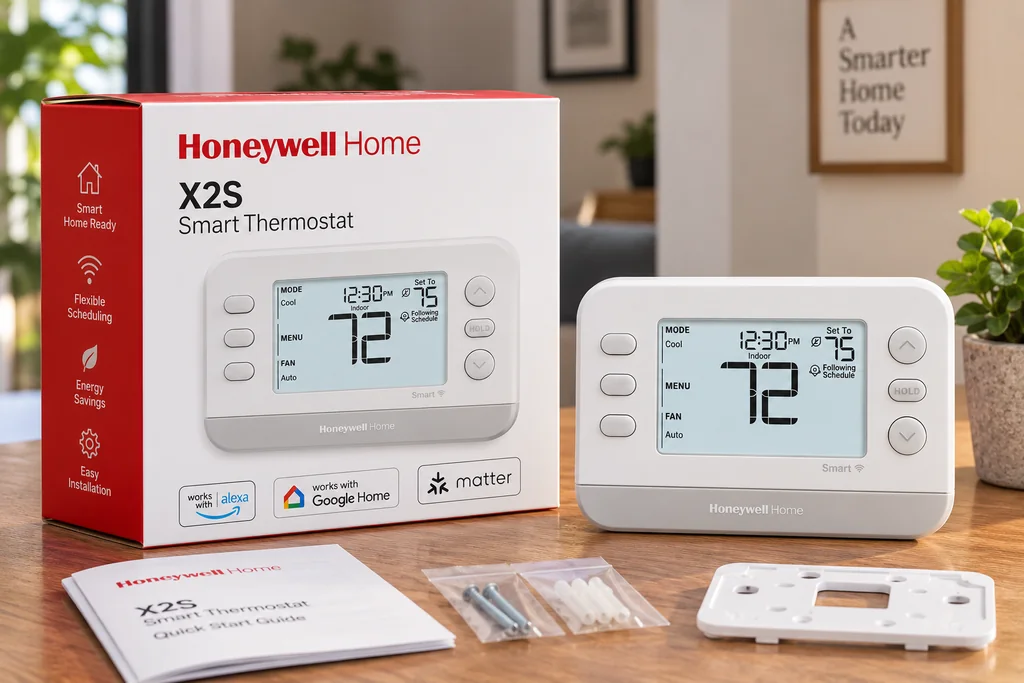
6. Honeywell Home X2S — Best Smart Thermostat for Beginners
A thermostat isn’t where we’d tell everyone to start.
Unlike a plug or bulb, thermostat installation requires you to understand whether the device is compatible with your HVAC system.
But if climate control is one of your priorities, the Honeywell Home X2S is a compelling budget option.
Resideo introduced the X2S with a $79.99 MSRP and lists features including Matter support, ENERGY STAR certification, scheduling, humidity monitoring and filter reminders. It also supports major smart-home ecosystems including Amazon Alexa, Apple Home and Google Assistant.
Why we recommend it
The X2S offers the smart features most beginners are likely to care about without pushing into premium thermostat pricing.
Remote control and schedules can make everyday heating and cooling management more convenient, while Matter support gives it broader smart-home appeal.
It also fits naturally into a smart home once you’ve already experimented with simpler devices.
What we don’t like
Compatibility is the important caveat.
Do not buy a thermostat simply because the feature list looks good.
Check your HVAC system and existing thermostat wiring against the manufacturer’s current compatibility requirements before ordering.
If you’re not comfortable working with thermostat wiring, professional installation is the better option.
Who should buy it?
Homeowners with a compatible HVAC system who want to add smart climate control without spending several hundred dollars.
See our Best Smart Thermostats Under $100 for alternatives, or read our Amazon Smart Thermostat Review if Alexa integration is your priority.
Bottom line: Don’t make a thermostat your first smart-home experiment, but the X2S is a sensible next step for compatible homes.
Which Smart Home Device Should You Buy First?
There isn’t one correct answer for every household.
Start with the problem you’re actually trying to solve.
| Your goal | Start with |
|---|---|
| Try smart-home automation cheaply | Smart plug |
| Control devices with your voice | Smart speaker |
| Automate a lamp or room | Smart bulb |
| Make devices react automatically | Smart sensor |
| Monitor visitors and deliveries | Video doorbell |
| Control heating and cooling | Smart thermostat |
If you don’t have a specific problem in mind and simply want to experiment, choose the smart plug.
Then use it for a while.
Learn whether you actually use schedules, voice control and automations before buying five more devices.
That’s a much better way to build a smart home than filling a shopping cart with gadgets before you know what will be useful.
Choose Your Smart Home Ecosystem Before Buying Too Much
You don’t necessarily need to commit to an ecosystem before buying your first device.
But you should have a general direction before your smart home grows.
The three most obvious choices for most beginners are Amazon Alexa, Google Home and Apple Home.
Amazon Alexa
Alexa makes sense if you already use Echo speakers or want voice control to play a central role in your smart home.
There is broad third-party device support, and some Echo models can also provide smart-home infrastructure for technologies such as Matter and Thread.
Google Home
Google Home is a natural choice if your household already uses Google services, Nest products or Google speakers and displays.
As with Alexa, you can combine products from multiple manufacturers rather than buying everything from Google.
Apple Home
Apple Home is particularly attractive to households already using iPhones, HomePods and Apple TVs.
Matter has made it easier for compatible third-party devices to participate in multiple ecosystems, although individual features can still differ between platforms.
Which ecosystem is best?
There isn’t a universal winner.
For beginners, the best ecosystem is usually the one that works well with the phones, speakers and services your household already uses.
Changing ecosystems becomes more annoying after you’ve purchased 20 devices, so think about this early.
What Is Matter, and Should Beginners Care?
Yes, but don’t buy a product solely because the Matter logo is printed on the box.
Matter is a smart-home interoperability standard designed to make compatible devices work across participating ecosystems more consistently.
It isn’t a replacement for Wi-Fi, Thread or Ethernet. Matter can operate over those underlying network technologies.
That distinction matters.
For example, the Tapo P125M is a Matter device that connects using Wi-Fi, while the Aqara P2 is a Matter device that communicates over Thread. The latter therefore requires Thread infrastructure that the Wi-Fi plug doesn’t.
For beginners, Matter can be valuable because it reduces some ecosystem lock-in and can make cross-platform device choices easier.
But Matter doesn’t guarantee that every manufacturer’s proprietary feature will appear identically in every ecosystem.
If you want to understand this before buying more devices, read our What Is Matter Protocol? guide and Matter vs Zigbee vs Z-Wave comparison.
Do You Need a Smart Home Hub?
Not necessarily.
This is one of the most confusing parts of building a first smart home because the word “hub” can refer to several different things.
Many Wi-Fi products work without a dedicated manufacturer hub. The Tapo L535E, for example, connects directly to Wi-Fi for normal Tapo operation.
Other products require additional infrastructure.
The Aqara P2 uses Matter over Thread, so it requires access to a compatible Thread Border Router and Matter controller for the ecosystem you’re using.
Zigbee devices may require a compatible Zigbee hub or controller.
So instead of asking only:
Ask:
What hardware does this product need to work with the ecosystem I want to use?
That’s the question that prevents compatibility surprises.
The Best Order to Build a Smart Home
You don’t have to automate your entire house at once.
For many beginners, this progression makes sense:
Step 1: Start with control
Buy one smart plug or smart bulb.
Learn how schedules, remote control and automations work.
Step 2: Add a controller
If voice control interests you, add a smart speaker that fits your preferred ecosystem.
Step 3: Add another device that solves a different problem
Don’t buy six more smart plugs simply because the first one worked.
Maybe your next device is a bulb, doorbell or thermostat.
Step 4: Add sensors
Once you understand your ecosystem, sensors can make automations respond to doors, motion, temperature or other conditions.
Step 5: Connect everything with useful routines
This is where the individual devices begin behaving like a smart home instead of a collection of gadgets.
A Simple Smart Home Setup for Beginners
One room is enough.
Imagine starting in your living room with:
- one smart plug
- one smart bulb
- one smart speaker
The smart plug controls a compatible lamp or appliance.
The smart bulb handles adjustable lighting.
The speaker provides voice control.
Now create one useful routine.
For example, a “Good Night” routine could turn off your compatible living-room devices and lighting with one command.
Once you start using that routine without thinking about it, you’ve found an automation that’s actually useful.
Then expand.
What Can You Build for Around $100?
You don’t need to spend your entire budget on one premium gadget.
Around $100 can potentially cover several basic devices depending on current prices and promotions.
A beginner setup might include:
- one or two smart plugs
- one or two smart bulbs
- an entry-level smart speaker
That gives you appliance control, lighting automation and voice control.
Prices change frequently, so we wouldn’t build the entire strategy around hitting exactly $100.
Focus on functionality rather than filling the budget.
For more inexpensive products, see our Best Budget Smart Home Devices Under $50.
What Should Beginners Avoid Buying First?
Some smart-home products are excellent devices but poor first purchases.
An entire house full of devices
Buying ten smart bulbs before trying one is unnecessary.
Test the concept in one room first.
You may discover that smart switches make more sense for your household, or that you only care about automated lighting in certain rooms.
Products that don’t fit your ecosystem
A bargain isn’t a bargain if the device doesn’t work the way you expected with your chosen platform.
Check compatibility before purchasing.
Complicated electrical projects
Smart switches, thermostats and other wired devices can be excellent upgrades, but they aren’t necessarily the best place to learn the basics.
If installation requires electrical work you’re not qualified or comfortable performing, use an appropriate professional.
Subscription-dependent products you haven’t researched
This matters particularly for cameras and doorbells.
Find out which features are included without a subscription, what can be stored locally and what requires an ongoing cloud plan before buying.
Too many different apps
Using multiple brands isn’t inherently bad.
But buying every device from a different manufacturer can leave you managing numerous accounts and apps for setup, firmware and advanced features.
Matter can reduce some of that friction, but it doesn’t make manufacturer apps irrelevant.
7 Things to Check Before Buying a Smart Home Device
1. Ecosystem compatibility
Check whether the product works with the platform you actually intend to use: Alexa, Google Home, Apple Home, SmartThings or another ecosystem.
Don’t rely solely on a generic “smart” label.
2. Connection type
Find out whether the product uses Wi-Fi, Thread, Zigbee, Z-Wave, Bluetooth or another technology.
Then determine whether additional hardware is required.
3. Installation requirements
A plug-in speaker and a hardwired thermostat are both smart devices, but their installation requirements are completely different.
Know what you’re getting into.
4. Subscription costs
Check whether core features require a recurring payment.
This is particularly important for security products.
5. Local versus cloud functionality
Some devices and automations can work locally, while others depend heavily on internet access or manufacturer cloud services.
If reliability during an internet outage matters to you, research this before buying.
6. Electrical and physical compatibility
Check bulb bases, voltage, plug ratings, thermostat wiring, switch requirements and physical dimensions where relevant.
Smart-home compatibility isn’t only about software.
7. Whether the device solves a real problem
This is the most important question.
If you can’t explain what a device will improve in your home, don’t buy it yet.
The Biggest Beginner Mistake: Buying Features Instead of Solving Problems
Smart-home products are filled with feature lists.
Matter. Thread. AI detection. Adaptive lighting. Energy monitoring. Presence sensing.
Those technologies can be useful, but they’re not reasons by themselves to buy something.
Start with the problem instead.
I always forget to turn off the living-room lamp.
Try a smart plug.
I want my hallway light to turn on automatically.
Consider a compatible light and sensor.
I want to know when a package arrives.
Consider a video doorbell.
I want better control over my heating and cooling schedule.
Check whether a smart thermostat is compatible with your HVAC system.
This approach produces a smart home built around your life instead of a collection of gadgets looking for a purpose.
Are Smart Home Devices Difficult to Set Up?
The easiest products usually aren’t.
A Wi-Fi smart plug or bulb may take only a few basic setup steps: install the manufacturer’s app, power the device, connect it and follow the onboarding process.
But setup complexity increases when you introduce technologies such as Thread and Zigbee, multiple ecosystems, wired installations and more advanced automations.
That’s why we recommend starting simple.
If you’re building from scratch, our complete guide to setting up a smart home explains the process in more detail.
How We Chose the Best Smart Home Devices for Beginners
This guide focuses on products and device categories that make sense for someone building a smart home for the first time.
We considered:
- ease of setup
- usefulness in everyday life
- ecosystem compatibility
- Matter support where relevant
- additional hardware requirements
- installation complexity
- local versus cloud options
- ongoing subscription requirements
- how easily each device can fit into a larger smart-home setup
We verified key product specifications using current manufacturer documentation from TP-Link/Tapo, Amazon, Aqara and Resideo/Honeywell Home.
Not every product featured on Smart Space Advisor has been physically tested by our team. When we have hands-on experience with a product, we identify that clearly. Otherwise, our evaluations are based on research that may include manufacturer documentation, technical specifications, independent certification, current pricing and other reliable sources.
Product features, compatibility and pricing can change. Always verify the current manufacturer’s specifications and compatibility requirements before purchasing.
Frequently Asked Questions
What is the best first smart home device?
For most beginners, we’d start with a smart plug. It’s inexpensive, easy to install and provides a simple introduction to remote control, scheduling and automation without requiring permanent changes to your home.
What are the easiest smart home devices to install?
Smart plugs, plug-in smart speakers and screw-in smart bulbs are generally among the easiest options because they normally don’t require electrical wiring changes.
How much should I spend on my first smart home?
You don’t need a large budget. It’s better to start with one or two useful devices and learn what features you actually use before investing in a larger system.
Do I need Alexa to have a smart home?
No. Alexa is one option. Google Home, Apple Home, SmartThings and other platforms can also manage compatible smart-home devices.
Do I need a smart speaker?
No. Many smart devices can be controlled through an app or another smart-home controller. A smart speaker mainly makes voice control more convenient and, depending on the model, may provide additional smart-home controller functionality.
Do all smart home devices use Wi-Fi?
No. Smart-home products can communicate using Wi-Fi, Thread, Zigbee, Z-Wave, Bluetooth and other technologies. Some require additional controllers or hubs.
Should beginners buy Matter-compatible devices?
Matter compatibility is worth considering when buying new equipment because it can provide more flexibility across participating ecosystems. However, you should still check the exact product’s requirements and supported features.
Can different smart-home brands work together?
Often, yes. Major smart-home platforms support products from multiple manufacturers, and Matter is designed to improve interoperability. However, manufacturer-specific features and ecosystem support can still vary.
Can I build a smart home without a hub?
Yes. Many Wi-Fi smart plugs, bulbs, speakers, cameras and other devices don’t require a dedicated manufacturer hub. Other products, including some Thread, Zigbee and Z-Wave devices, require compatible infrastructure.
What should I automate first?
Start with something repetitive that you already do every day. Turning lights on at sunset, switching devices off at bedtime or controlling a frequently used lamp are better first automations than creating a complicated whole-house routine.
Final Verdict: What Should a Beginner Buy First?
Building a smart home in 2026 doesn’t require buying everything at once.
For most beginners, we’d start with the Tapo P125M smart plug. It’s simple, relatively inexpensive, Matter-compatible and gives you an immediate way to experiment with schedules, remote control and automation.
If lighting is your priority, start with a smart bulb instead. If you want voice control, add a smart speaker. Sensors, video doorbells and thermostats make more sense once you know what you want your smart home to accomplish.
Most importantly, choose devices because they solve a problem—not because they have the longest feature list.
Start with one room. Create one useful automation. Live with it for a while.
Then build from there.
A good smart home isn’t the one with the most connected devices. It’s the one that makes everyday life easier.

Ryan Hayes
Founder & EditorRyan Hayes is the founder and editor of Smart Space Advisor, where he researches and evaluates smart home technology to help readers make informed buying decisions. His work focuses on smart security, video doorbells, smart plugs, lighting, and connected-home platforms including Matter, Alexa, Google Home, and Apple Home. By combining product research, manufacturer documentation, feature comparisons, and real-world considerations, Ryan aims to cut through technical jargon and provide practical, straightforward advice about which smart home products offer genuine value.